⏱ TL;DR
Runway Gen-4.5 is the quality leader (#1 benchmark, best for professional work). Kling 3.0 is the value champion (cheapest per video, longest clips, best audio, daily free credits). Pika 2.5 is the creative sandbox (physics effects, easiest to use, cheapest entry). Pick Runway for client deliverables. Pick Kling for high-volume production and social content. Pick Pika for experimentation and quick prototypes.
⚠️ Important: OpenAI's Sora was discontinued on April 26, 2026. It is no longer an option. This article covers the three dominant alternatives.
⚰️ What Happened to Sora?
On March 24, 2026, OpenAI announced it was shutting down Sora — its flagship AI video generator. By April 26, the web and mobile apps were permanently closed. The API is scheduled for full shutdown by September 2026. Even the reported $1 billion Disney partnership (for Marvel, Star Wars, and Pixar character generation) was abandoned.
Peak downloads hit ~3.3 million/month (November 2025) but had fallen to ~1.1 million by February 2026. OpenAI is reportedly developing a replacement code-named "Spud" for future video generation within ChatGPT, but as of July 2026, nothing has launched.
Bottom line: If you were comparing AI video tools, Sora is no longer part of the conversation. The three active leaders are Runway, Kling, and Pika.
📊 At a Glance
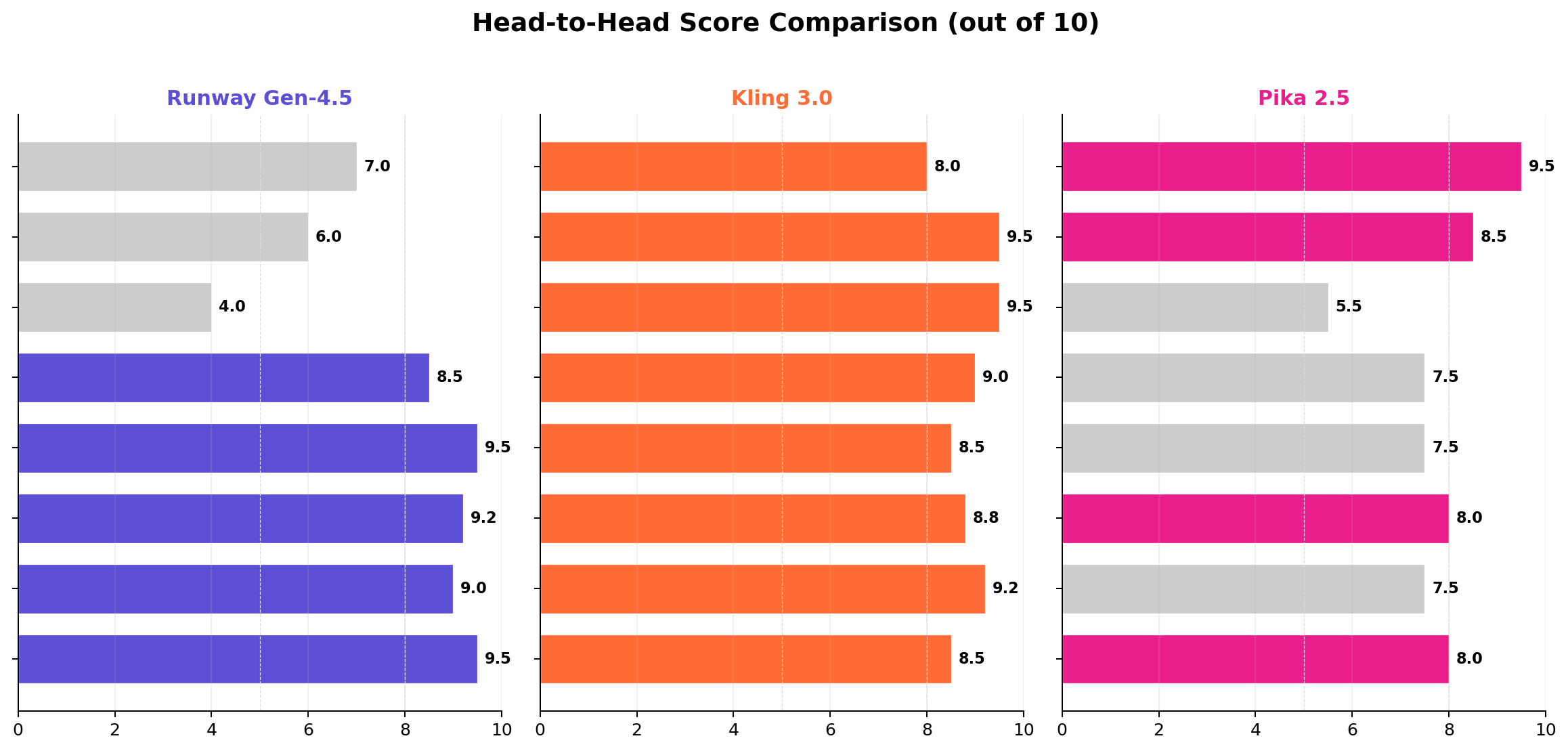
| Dimension | Runway Gen-4.5 | Kling 3.0 | Pika 2.5 | Winner |
|---|---|---|---|---|
| Visual Quality | Best (1,247 Elo #1) | Strong (1080p native) | Good (480-1080p) | 🟣 Runway |
| Motion Realism | Controlled, polished | Strongest body movement | Decent | 🟠 Kling |
| Max Clip Length | 16 seconds | 3 minutes | 30 seconds | 🟠 Kling |
| Audio & Lip Sync | Basic SFX | Voiceover + lip sync (5 langs) | Context-aware SFX | 🟠 Kling |
| Price (Entry) | $15/month | $6.99/month | $8/month | 🟠 Kling |
| Cost per Video | ~$0.50 | ~$0.20 | ~$0.25 | 🟠 Kling |
| Free Tier | 125 credits (one-time) | 66 credits/day | 80 credits (one-time) | 🟠 Kling |
| In-Video Editing | Full (Aleph + Act-Two) | 7-in-1 Multi-Modal | Pikaswaps/Scenes | 🟣 Runway |
| Creative Effects | Multi-shot, Workflows | Draft Mode, Multi-Shot | Pikaffects (physics sim) | 🩷 Pika |
| API Access | Full, well-documented | Yes (via fal.ai) | No | 🟣 Runway |
🟣 Runway Gen-4.5 Deep Dive
Overview
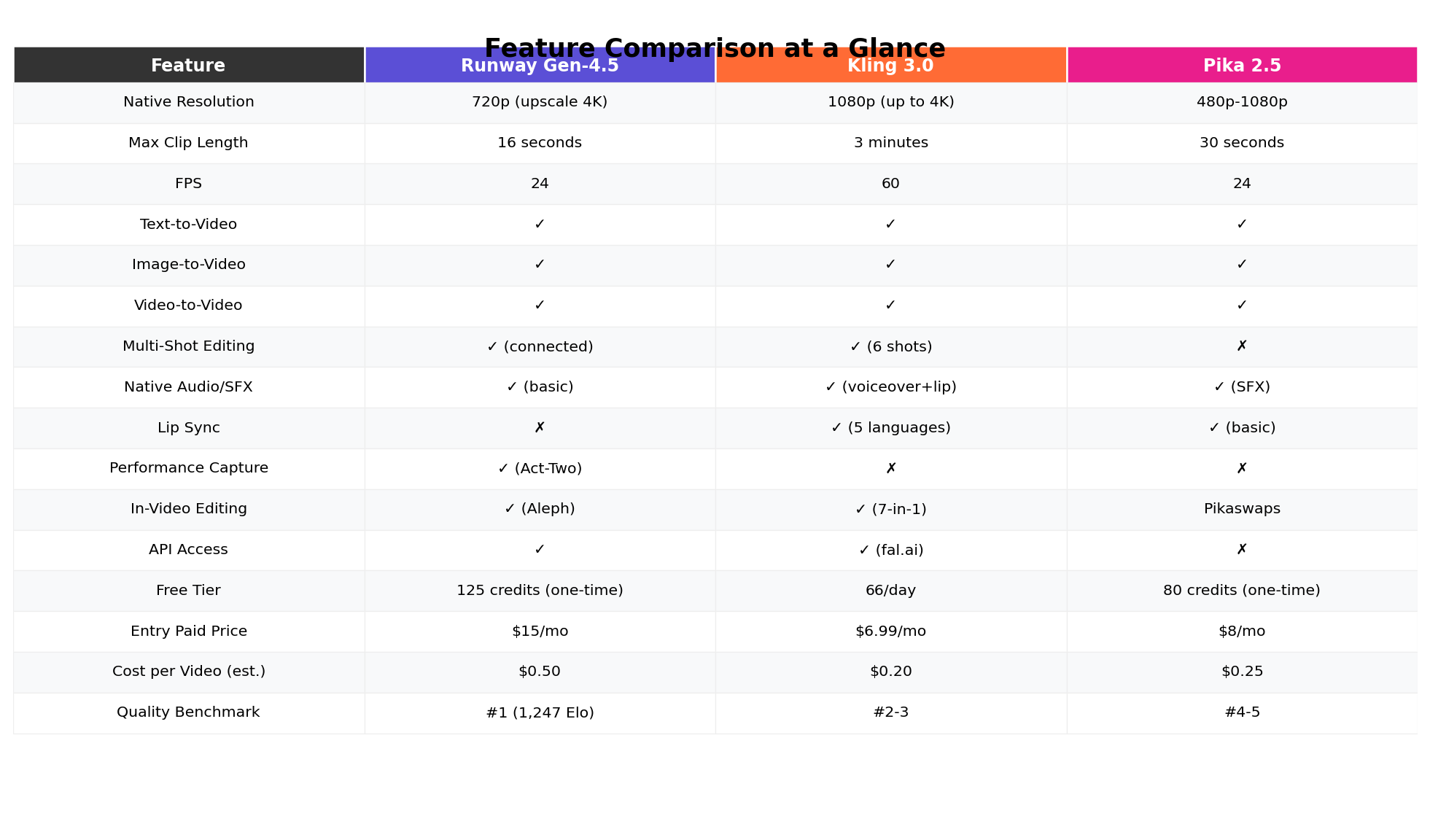
Runway ML, founded in 2018 and valued at $5.3 billion, is the current market leader in AI video generation. Its Gen-4.5 model holds the #1 position on the Artificial Analysis benchmark with 1,247 Elo points and has topped the Video Arena leaderboard for visual quality, prompt adherence, and motion fidelity. Runway's partnerships with Lionsgate, IMAX, and NVIDIA underscore its professional positioning.
Runway isn't just a video generator — it's a complete creative workspace. The platform offers text-to-video, image-to-video, video-to-video, multi-shot editing, performance capture, in-video editing, node-based workflow automation, and real-time interactive characters.
Key Features
- Gen-4.5 — Flagship model, 1,247 Elo (#1 benchmark), photorealistic + non-photorealistic output
- Seedance 2.0 — Native 4K output at 3840×2160 (added June 2026), but expensive (150 credits/sec)
- Aleph — In-video editor: change lighting, swap objects, alter color grade after generation without regenerating
- Act-Two — Performance capture: maps your facial expressions and body movements onto AI-generated characters
- Multi-Shot — Connect multiple shots into a coherent sequence with consistent characters and style
- Characters — Create real-time interactive avatars from a single reference image (launched March 2026)
- Workflows — Node-based pipeline automation for batch processing and complex generation chains
- Third-party models — Access Kling 3.0, Sora 2 Pro, and GPT-Image-1.5 directly inside Runway
- Magnific Upscaler — Upscale output to 720p/1K/2K/4K via API (June 2026)
- Native audio — Generates matching sound effects (doors closing, rain, engines, footsteps)
Pricing (Credit-Based)
| Plan | Monthly | Annual | Credits/month | Gen-4.5 (~25 cr/s) |
|---|---|---|---|---|
| Free | $0 | $0 | 125 (one-time) | ~5 seconds total |
| Standard | $15 | $12 | 625 | ~25 seconds |
| Pro | $35 | $28 | 2,250 | ~90 seconds |
| Unlimited | $95 | $76 | Unlimited Turbo + credits | Unlimited Turbo + bonus |
The catch: Gen-4.5 burns credits at ~25 credits/second. On the Standard plan ($15/month), you get roughly 25 seconds of Gen-4.5 footage per month. Seedance 2.0 4K costs 150 credits/second — about 4 seconds on Standard. The Unlimited plan is the practical minimum for serious work.
Strengths
- ✅ #1 quality on all major benchmarks — the gold standard for visual output
- ✅ Most complete creative workspace — generation, editing, performance capture, workflows in one platform
- ✅ Aleph in-video editor — change elements without regenerating, saves credits
- ✅ Act-Two performance capture — unique capability not available elsewhere
- ✅ Full API with Gen-4.5 access (since Feb 2026)
- ✅ Enterprise partnerships (Lionsgate, IMAX) signal professional trust
Weaknesses
- ❌ Expensive — credits burn fast, practical minimum is $95/month Unlimited plan
- ❌ Native resolution only 720p — 4K requires Seedance 2.0 at 6x the credit cost or Magnific upscaler
- ❌ Short max clips — 10 seconds (Free/Standard), 16 seconds (Pro) — by far the shortest
- ❌ No lip sync — audio is limited to basic sound effects
- ❌ Steeper learning curve — full workspace has many tools, can overwhelm new users
🟠 Kling 3.0 Deep Dive
Overview
Kling AI, developed by Kuaishou Technology (China's largest short-video platform, analogous to TikTok), has grown into a global powerhouse with 60 million+ creators and 600 million+ videos generated. Kling 3.0, the latest version, introduces an "Omni One" architecture with physics-accurate motion, multi-shot editing (up to 6 connected shots), 4K 60fps output, and native audio-visual generation including lip sync.
What makes Kling remarkable is its value proposition: at approximately $0.20 per video, it's the cheapest high-quality option on the market. Combined with daily free credits (66/day, no rollover), the longest clips of any competitor (up to 3 minutes), and the most advanced audio capabilities, Kling delivers exceptional bang for the buck.
Key Features
- Kling 3.0 — Omni One architecture, physics-accurate motion, up to 4K 60fps
- Multi-Shot — Up to 6 connected shots with consistent characters and environment (3.0)
- Native Audio Generation — Voiceovers, SFX, music, ambient audio, and lip sync in 5 languages (English, Chinese, Japanese, Korean, Spanish)
- Camera Controls — Pan, tilt, zoom, dolly, tracking shot, crane shot, rack focus
- Start/End Frame Mode — Upload two images and Kling generates the transition video between them
- Element Library — Save recurring characters, products, and props for consistent use across generations
- Draft Mode — 5-20x faster low-resolution previews for prompt testing before final generation (3.0)
- O3 Reasoning Model — Highest quality output using advanced reasoning (significantly more credits)
- 7-in-1 Multi-Modal Editor — Comprehensive post-generation editing suite
- 3-minute max duration — Longest of any AI video generator (extendable clips)
Pricing (Credit-Based)
| Plan | Monthly | Annual | Credits/month | ~10-sec Std Videos |
|---|---|---|---|---|
| Free | $0 | $0 | 66/day (no rollover) | ~3/day or ~90/month |
| Standard | $6.99 | $69.99/yr | 660 | ~33/month |
| Pro | $25.99 | $259.99/yr | 3,000 | ~150/month |
| Premier | $64.99 | $649.99/yr | 8,000 | ~400/month |
Value breakdown: A 10-second Standard Mode video costs 10 credits (~$0.10). Professional Mode costs 35 credits (~$0.35). Audio generation costs ~6x more credits (42 credits/sec). Annual billing saves ~34%. Paid plans have 2-year credit rollover. At $6.99/month, Standard gives you 33 ten-second Standard videos — more usable output than Runway's $15/month plan.
Strengths
- ✅ Best value per video — ~$0.20 average, cheapest entry at $6.99/month
- ✅ Daily free credits (66/day) — genuinely useful for testing and light production
- ✅ Longest clips — up to 3 minutes, far surpassing competitors
- ✅ Best audio/lip sync — voiceovers, SFX, music, lip sync in 5 languages
- ✅ Native 1080p resolution (up to 4K 60fps on 3.0)
- ✅ Multi-shot with character consistency across 6 shots
- ✅ Element Library for recurring characters and products
- ✅ Draft Mode for fast prompt iteration before committing credits
Weaknesses
- ❌ Visual quality is strong but not #1 benchmark — Runway leads on pure image quality
- ❌ Audio generation costs 6x more credits — budget accordingly
- ❌ No performance capture or real-time character interaction
- ❌ Chinese company — some enterprise users have data residency concerns
- ❌ UI less polished than Runway's professional workspace
🩷 Pika 2.5 Deep Dive
Overview
Pika Labs started as a Discord-based experiment and has evolved into a full professional suite at pika.art, available on web and iOS with cross-platform synchronization. Pika 2.5 scores 9.0/10 on UlazAI's quality scale and is widely regarded as the most fun and controllable AI video tool — particularly for its signature "Pikaffects" physics simulation system.
Pika occupies a unique niche: it's not trying to be the professional production tool that Runway is, nor the volume workhorse that Kling is. Instead, Pika is a creative sandbox for experimentation, rapid prototyping, and social media content where creative effects matter more than cinematic perfection.
Key Features
- Pikaffects (Physics Simulations) — The standout feature: Crush & Melt, Inflate & Pop, Pikatwists, and more. Objects react with physics-aware logic — weight, force, liquid flow, balloon squish
- Pikaswaps — Object replacement and inpainting within video frames
- Pikascenes — Alter environmental backgrounds while preserving foreground subjects
- Pikaadditions — Add new elements to existing scenes
- Pikaframes — Precise aspect ratio control for image-to-video generation
- Automatic SFX — Context-aware sound effects generated with each video
- Upgraded Lip Sync — Complex facial expression synchronization
- Cross-platform sync — Web and iOS app with real-time synchronization
Pricing
| Plan | Price | Credits/month | Key Features |
|---|---|---|---|
| Basic | $0 | 80 (one-time) | 480p only, watermarked, no commercial use |
| Standard | $8/month | 700 | All resolutions, no watermark, commercial use |
| Pro | $28/month | 2,300 | Fastest generations, early access to Pikaffects |
| Fancy | $76/month | 6,000 | Power user tier with maximum capacity |
Strengths
- ✅ Most creative control — Pikaffects physics simulations are unique and genuinely useful
- ✅ Easiest to learn — intuitive UI, lowest barrier to entry
- ✅ Cheapest meaningful paid tier at $8/month with commercial license
- ✅ Pikaswaps/Scenes/Additions — granular video manipulation tools
- ✅ Fun factor — the most enjoyable tool to experiment with
Weaknesses
- ❌ Not suitable for professional client work — inconsistency in output quality
- ❌ No API access — can't build automated workflows
- ❌ Resolution limited to 480p on free tier
- ❌ Shorter max clips (30 seconds) vs. Kling's 3 minutes
- ❌ Customer support and billing concerns reported by users
⚔️ Head-to-Head Comparison
1. Visual Quality — Winner: Runway 🏆
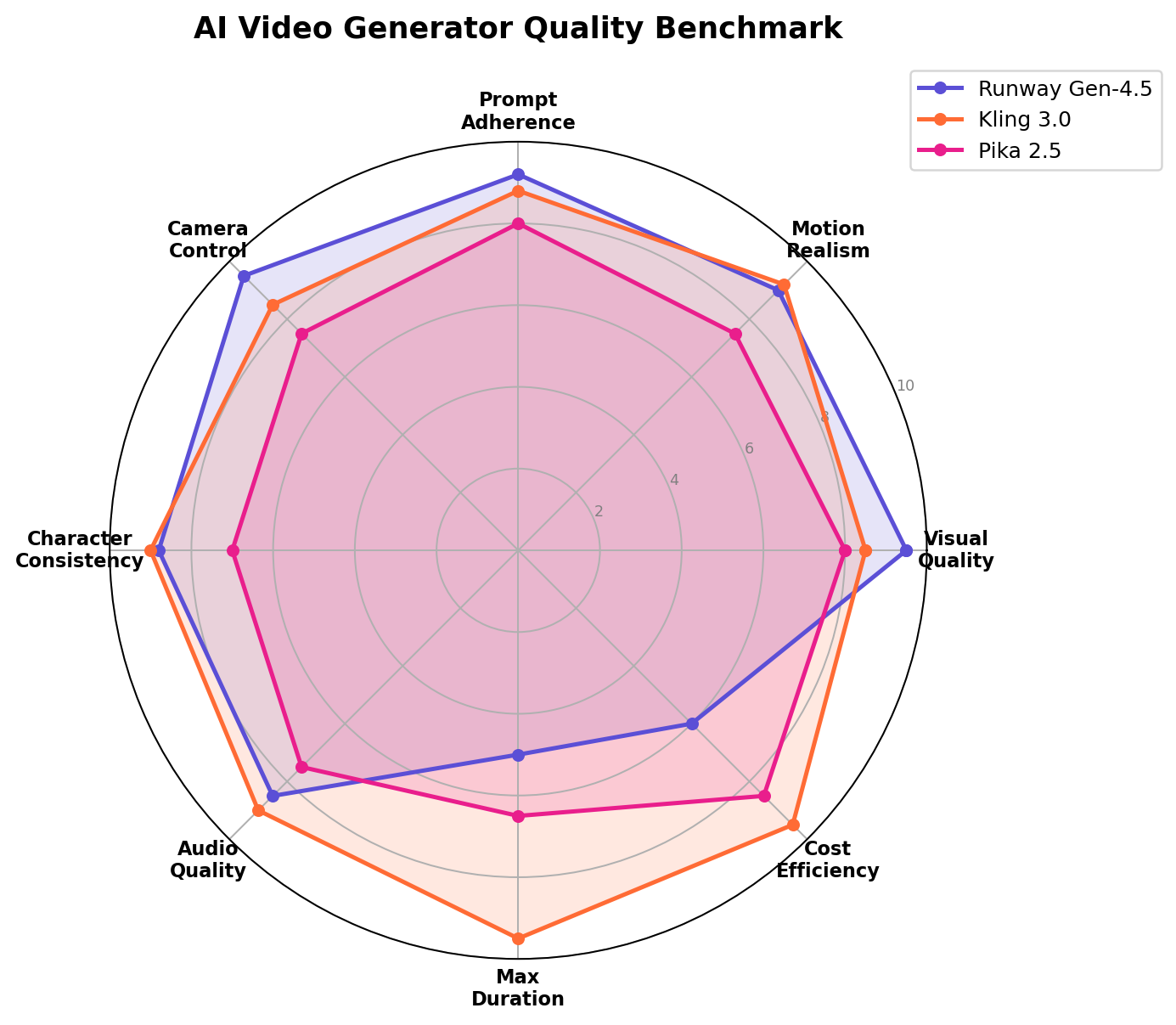
Runway Gen-4.5 is the undisputed quality leader with 1,247 Elo on Artificial Analysis and #1 on Video Arena. Its output has cinematic depth, sophisticated lighting, and natural motion that competitors haven't matched. Kling produces excellent 1080p footage that's close behind, particularly for realistic body movement. Pika is capable but produces output that looks more "AI-generated" — slightly synthetic compared to Runway's editorial polish.
2. Motion Realism — Winner: Kling 🏆
Kling 3.0's Omni One architecture produces the most physically accurate motion, especially for complex body movements, cloth simulation, and fluid dynamics. Runway's motion is polished and controlled but can sometimes feel choreographed rather than natural. Pika's motion is decent for simple animations but struggles with complex multi-body interactions.
3. Clip Length & Duration — Winner: Kling 🏆
This isn't close. Kling supports clips up to 3 minutes — extendable through concatenation — while Runway maxes out at 16 seconds and Pika at 30 seconds. For social media content, YouTube shorts, or any application requiring more than a few seconds of footage, Kling is the only practical option without stitching multiple generations.
4. Audio & Lip Sync — Winner: Kling 🏆
Kling's native audio generation is the most comprehensive in the industry. It produces voiceovers, sound effects, music, ambient audio, and lip sync in 5 languages — all generated alongside the video. Runway offers basic sound effects only. Pika provides context-aware SFX. If your videos need spoken dialogue or synchronized lip movement, Kling is the only viable choice.
5. Pricing & Value — Winner: Kling 🏆
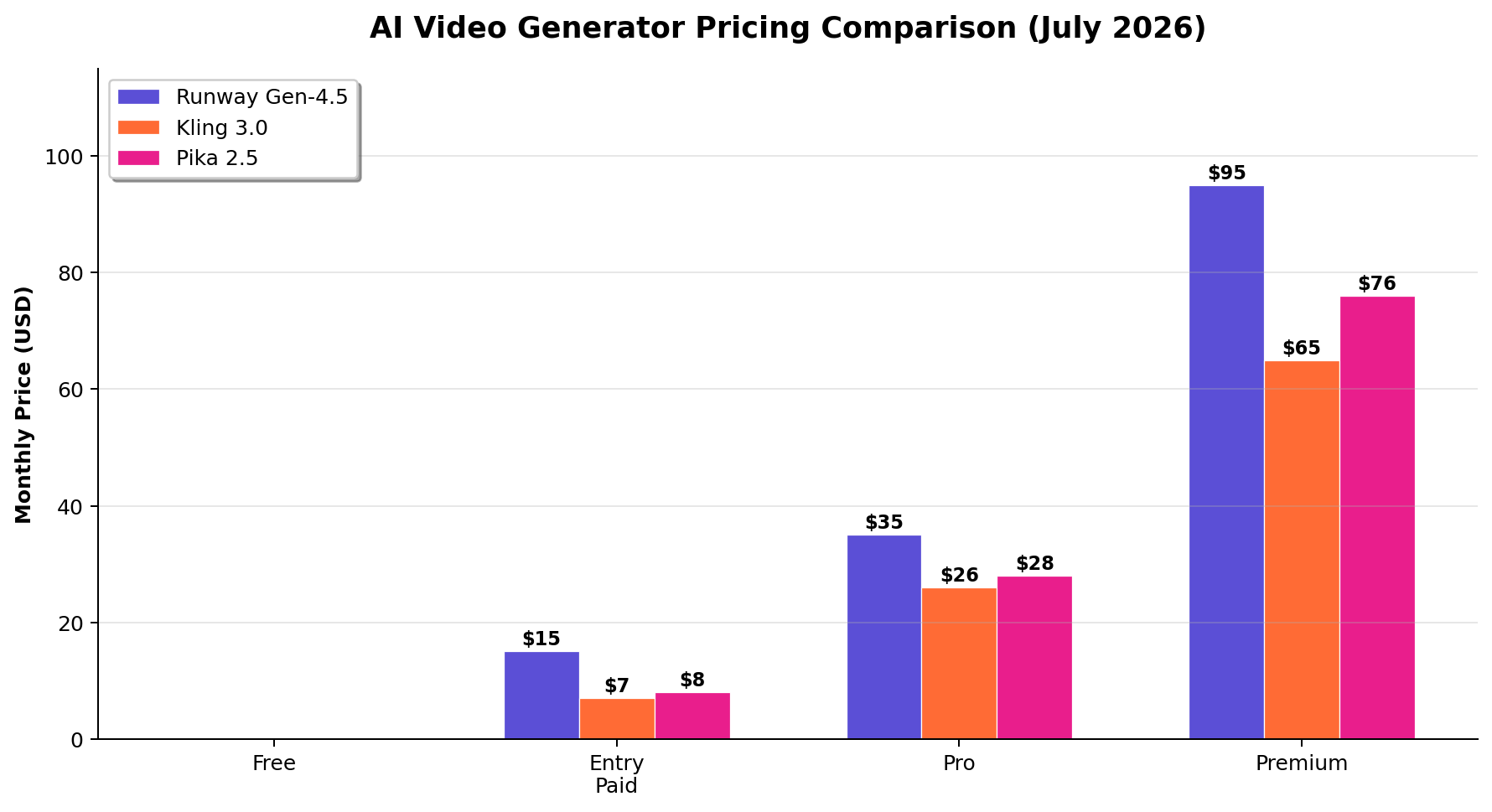
Kling delivers the best value at every price point. Its free tier gives 66 credits per day (roughly 3 ten-second Standard videos daily), compared to Runway's 125 one-time credits and Pika's 80 one-time credits. At the entry paid tier, Kling Standard ($6.99/mo) gives 660 credits with 2-year rollover, while Runway Standard ($15/mo) gives only 625 credits that burn ~2.5x faster on Gen-4.5.
6. Creative Tools & Effects — Winner: Pika 🏆
Pika's Pikaffects system is genuinely unique — no other tool offers physics simulation effects like Crush & Melt, Inflate & Pop, and Pikatwists. These are production-ready creative tools, not toys. Combined with Pikaswaps (object replacement), Pikascenes (background alteration), and Pikaadditions (element insertion), Pika offers the most granular creative control over individual frames and objects within generated video.
7. Professional Workflow — Winner: Runway 🏆
Runway's complete workspace — combining generation, Aleph's in-video editing, Act-Two performance capture, Multi-Shot sequences, and node-based Workflows — is the most comprehensive professional tool in the market. It's designed for agencies and production studios who need an end-to-end pipeline. The API is well-documented and supports automated generation at scale. Kling is broad but shallower in its editing tools; Pika lacks API access entirely.
🎯 Decision Guide: Which One Should You Choose?
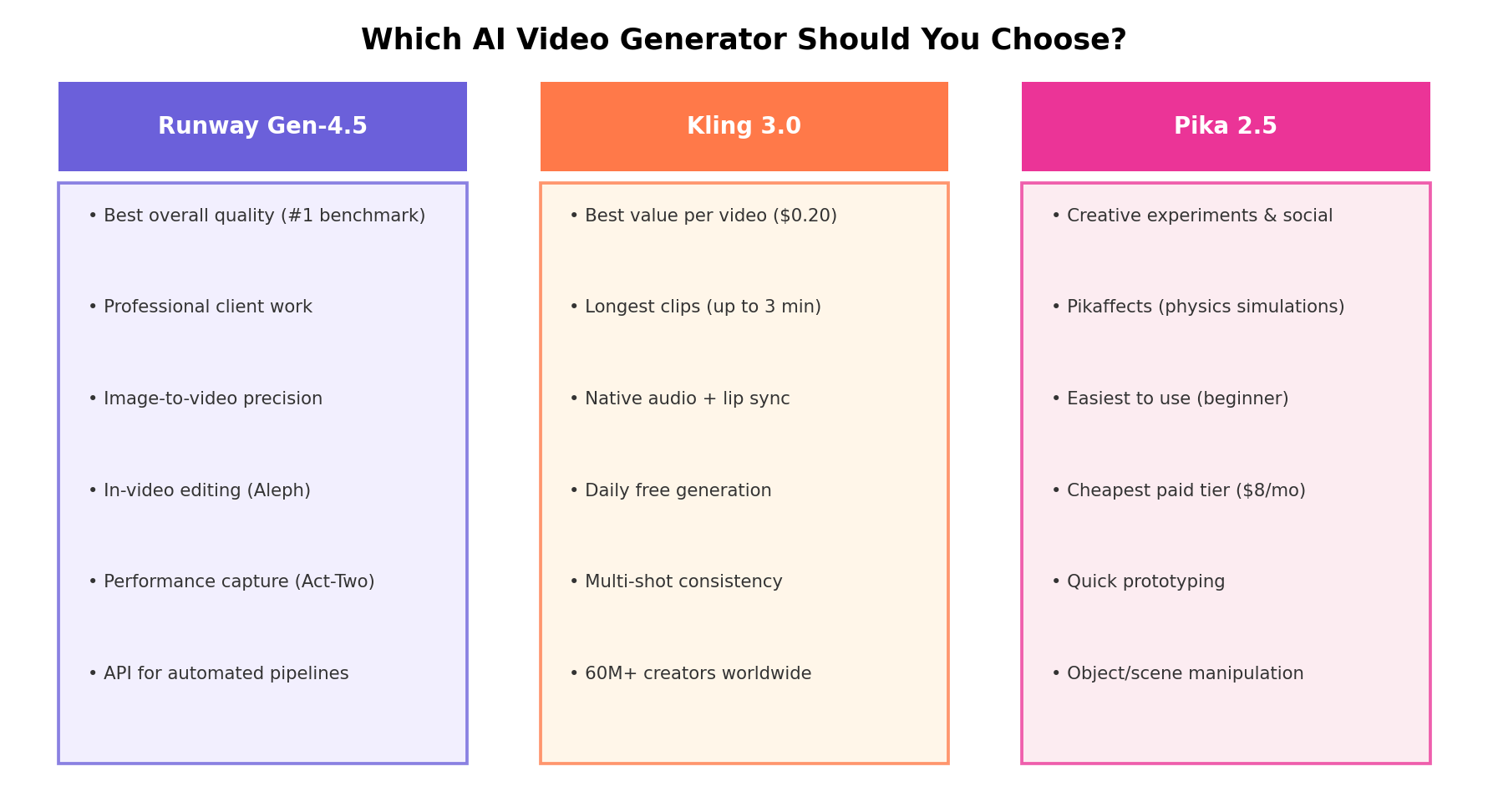
Choose Runway If:
- You're producing client deliverables where visual quality is paramount
- You need in-video editing (change lighting, swap objects without regenerating)
- You want performance capture — mapping your face/body onto AI characters
- You need API access for automated content pipelines
- Budget is $95+/month (Unlimited plan is the practical minimum for serious work)
- You're an agency, production studio, or enterprise with professional standards
Choose Kling If:
- You need the most video output for your budget (best cost-per-usable-clip)
- Your videos need spoken dialogue or lip sync
- You need clips longer than 30 seconds (up to 3 minutes)
- You create social media content at volume (daily free credits + cheap paid)
- You want to test prompts before committing credits (Draft Mode)
- Budget is $7-26/month
Choose Pika If:
- You want creative experimentation with physics effects (Pikaffects)
- You need the lowest learning curve (easiest to use)
- You're prototyping concepts quickly before final production on another tool
- You create social media content where fun/unique effects matter more than cinematic quality
- Budget is $8/month or less
🔄 The Pro Hybrid Workflow
Most professional AI video creators in 2026 don't pick one tool — they use all three. Here's the dominant workflow pattern from community discussions:
Recommended Hybrid Workflow (~$50/month total)
- Generate reference stills — Midjourney for concept art and moodboards
- Draft videos on Kling — Test prompts, explore shots, iterate quickly (cheapest, Draft Mode)
- Produce hero shots on Runway — Final, highest-quality clips for client deliverables
- Add lip sync on Kling — If dialogue is needed, use Kling's native lip sync
- Creative effects on Pika — Add Pikaffects physics simulations for social media cuts
- Upscale with Magnific — Runway's 4K upscaler or third-party tools for final delivery
Total cost: Kling Pro ($25.99/mo) + Runway Pro ($35/mo) = ~$61/month. Or Kling Standard ($6.99) + Runway Unlimited ($95) for high-volume Runway use.
🔄 Alternatives Worth Considering
| Tool | Starting Price | Standout Feature | Best For |
|---|---|---|---|
| Google Veo 3.1 | ~€1.12/video (Gemini Advanced) | Highest quality scores (9.1/10) | Enterprise premium production |
| Luma Dream Machine | Free tier; $29.99/mo | Consistent image-to-video | Animators, motion design |
| Hailuo AI (MiniMax) | Free tier; $9.99/mo | Rising quality competitor | Budget creators exploring options |
| Higgsfield | Free; $16/mo | Character consistency focus | Storytelling, character-driven content |
| Seedance 2.0 (via Luno) | Varies | Native 4K, consistent I2V | Professional image-to-video pipeline |
🏆 The Verdict
Best Overall Quality → Runway Gen-4.5
Runway holds the #1 benchmark position and delivers the best visual quality in the industry. Its comprehensive workspace — generation, editing, performance capture, workflows — makes it the only tool suitable for professional client deliverables. If quality is your top priority and budget isn't the constraint, Runway is the clear choice.
Best Value & Most Versatile → Kling 3.0
Kling delivers the most usable output per dollar at every price point. Daily free credits, the longest clips (3 minutes), the best audio/lip sync, and Draft Mode for efficient iteration make it the best all-around tool for 90% of users. At $6.99/month for Standard or $25.99 for Pro, it's accessible to creators at every level.
Best for Creative Experimentation → Pika 2.5
Pika's Pikaffects physics simulation system is genuinely unique and production-ready. It's the most fun tool to use and the easiest to learn. For social media creators, rapid prototypers, and anyone who needs creative effects over cinematic polish, Pika delivers at the lowest entry price ($8/month).
Our Recommendation for Most People → Kling 3.0
Unless you're producing client work that demands benchmark-topping quality, Kling 3.0 is the tool we'd recommend first. It offers the best balance of quality, features, pricing, and output volume. Start with the free tier (66 credits/day), upgrade to Standard ($6.99/mo) when you need more, and add Runway only when specific projects require its superior visual quality or professional editing tools.
❓ Frequently Asked Questions
What happened to OpenAI Sora?
OpenAI discontinued Sora on April 26, 2026. The web app and mobile app were permanently shut down, with the API scheduled for full shutdown by September 2026. Even a reported $1 billion Disney partnership was abandoned. OpenAI is reportedly developing a replacement code-named "Spud" for future video generation within ChatGPT, but nothing has launched as of July 2026.
Which AI video generator produces the best quality?
Runway Gen-4.5 currently holds the #1 position on the Artificial Analysis benchmark with 1,247 Elo points and tops the Video Arena leaderboard. It delivers the most polished, cinematic output — particularly for photorealistic content, controlled motion, and prompt adherence. However, its native resolution is only 720p; 4K requires the expensive Seedance 2.0 model or Magnific upscaler.
Which AI video generator is the cheapest?
Kling 3.0 offers the best value at approximately $0.20 per video. Its free tier gives 66 credits per day (roughly 3 ten-second Standard videos daily) with no expiry. The entry paid plan is just $6.99/month for 660 credits. By comparison, Runway's entry plan at $15/month gives only ~25 seconds of Gen-4.5 footage. Kling also offers the longest clips (up to 3 minutes) and the most advanced audio features.
Can AI video generators produce audio?
Yes, but capabilities vary significantly. Kling 3.0 has the most advanced audio — native voiceovers, sound effects, music, ambient audio, and lip sync in 5 languages (English, Chinese, Japanese, Korean, Spanish). Runway generates basic sound effects (doors, rain, footsteps). Pika provides automatic context-aware sound effects. If your videos need spoken dialogue, Kling is the only practical choice.
Should I use multiple AI video generators?
Many professionals do, and it's the recommended approach for serious work. A common pattern: draft on Kling (cheapest, longest clips, Draft Mode for quick iteration), produce hero shots on Runway (best quality), add lip sync on Kling, and create social media cuts with Pika effects. This hybrid workflow costs ~$50-61/month total and gives you the strengths of each tool while working around their individual limitations.
Is Kling available outside of China?
Yes. Kling is available globally at klingai.com — no downloads required, it runs entirely in the browser. It's used by 60 million+ creators worldwide. The platform is in English and supports content generation in multiple languages. Some enterprise users may have data residency concerns since it's developed by Kuaishou (a Chinese company), but for most individual creators, this is not an issue.
Can I make money with AI video generators?
Yes, and many creators already do. Common monetization paths: YouTube Shorts/TikTok content (Kling's long clips are ideal), product commercials and ads (Runway's quality), social media creative content (Pika's effects), stock footage sales, and client video production services. The key is using the right tool for the right output — not expecting one tool to do everything.